To make songs sound right and stay in key, knowing how to tune your guitar is non-negotiable for every guitarist—especially beginners. Even the finest guitar will sound muddy and off-key if its strings are out of tune. Tuning is not a minor side task; it is a core foundational habit in your guitar journey.
Today, players have several convenient ways to tune: clip-on tuners, mobile apps, online web tuners, or tuning by ear. In this guide, we walk through how to tune a guitar using GuitarTuna—the fastest, easiest, and most beginner-friendly method.
What Are the Most Common Ways to Tune a Guitar?
Before diving in, here are the 4 main ways guitarists tune up:
- Clip-on or digital electronic tuner
- Tuning by ear (matching intervals or reference pitches)
- Using a smartphone tuner app
- Using an online browser tuner
Among these, tuning with a smartphone app is the most popular choice because it is free, convenient, accurate, and works with every guitar type.
Reliable tuner apps include:
-
GuitarTuna
-
Cifra Club Tuner
-
Tuner Tool
-
Acoustic Guitar Tuner (iOS)
Below we use GuitarTuna as our step-by-step example because of its accuracy and intuitive interface for first-time players.
How to Tune an Acoustic Guitar Using GuitarTuna
Follow these three steps to bring all six strings to concert pitch in just a couple of minutes:
Step 1: Download and Install GuitarTuna
Search for GuitarTuna on the Apple App Store or Google Play. It supports acoustic, classical, electric, bass, ukulele, and more.
Install the “GuitarTuna” app on your phone:
iOS link: https://apps.apple.com/app/guitartuna-tune-play-guitar/id527588389
Android link: https://play.google.com/store/apps/details?id=com.ovelin.guitartuna&pcampaignid=web_share
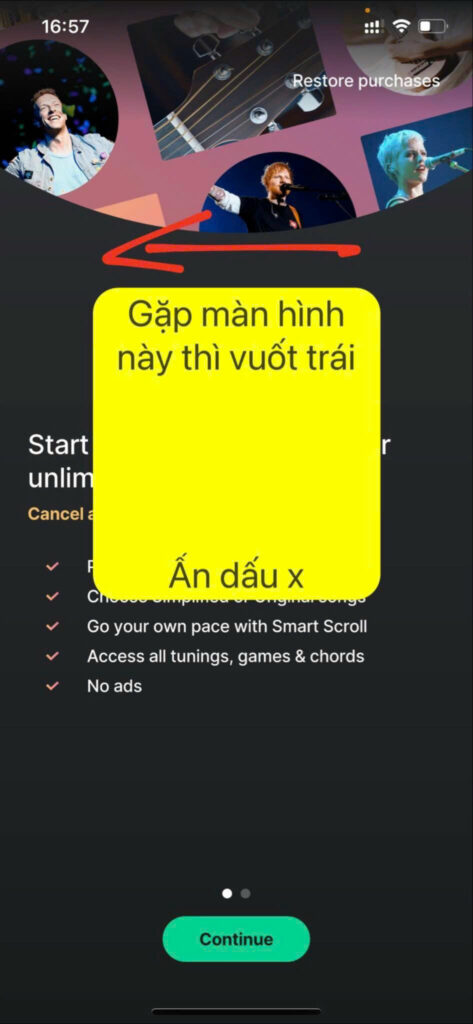
Swipe through this welcome screen after installing
Tap OK when prompted for microphone access; when a subscription screen appears, swipe left and tap the X button in the top-left corner (as shown in the guide).
Step 2: Tune Each String One by One
-
Open the app and select Standard Guitar mode.
-
Pluck one open string clearly at a time.
-
As the microphone picks up the note, the app shows the detected string and how close it is to target pitch.
-
Turn the corresponding tuning peg until the needle centers and the app flashes a green checkmark, confirming standard pitch.
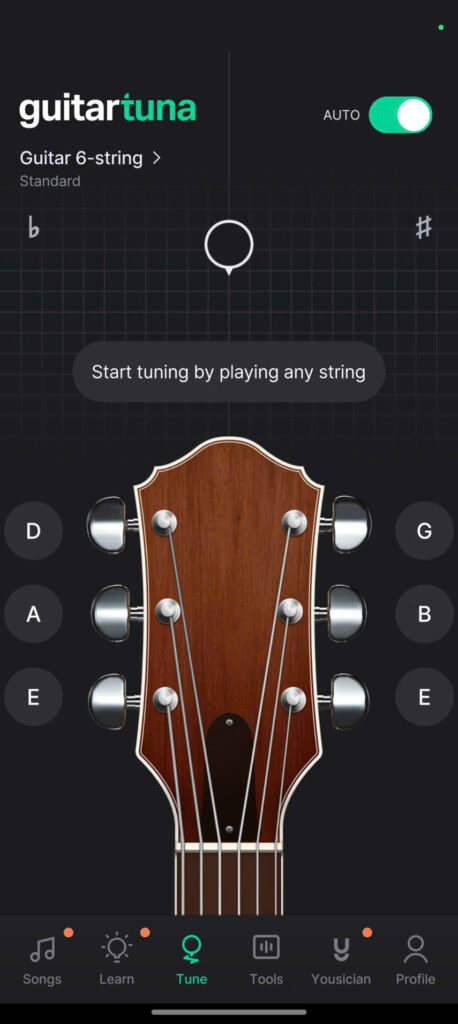
Guitar tuning screen on the mobile app
Step 3: Turn the Peg in the Right Direction
-
If the app shows the pitch is too low (below target Hz) → turn the tuning peg clockwise to tighten the string.
-
If the app shows the pitch is too high (above target Hz) → turn the tuning peg counter-clockwise to loosen tension.
Repeat for all 6 strings from thickest to thinnest (6th string E down to 1st string E).
Important Tips When Tuning With GuitarTuna
Keep these habits in mind for smooth, safe tuning:
-
The red highlight circle on screen indicates which tuning peg corresponds to the selected string.
-
The app hears frequency—it cannot tell which physical string you meant to pluck. Beginners should turn Auto mode off and tap the exact string manually to avoid overtightening the wrong string.
-
Make small, gentle turns as you approach the center line to avoid snapping a string.
-
Once all 6 strings are tuned, strum or pluck through them again to confirm everything holds steady.
VIDEO GUIDE: HOW TO TUNE YOUR GUITAR WITH A PHONE APP
Conclusion
Knowing how to tune your guitar keeps your ear sharp and makes every practice session far more rewarding. With GuitarTuna, beginners can tune quickly, accurately, and completely free. Spend two minutes tuning before every session and you will immediately hear the difference.
Happy tuning—and enjoy playing great music every day!